
.png)
Description
Download AI ColoringPage Online – Free, Secure & Fast AI‑Powered Coloring Page Generator
Overview
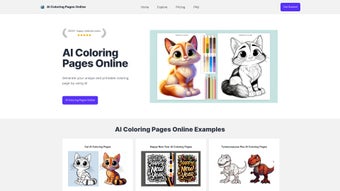
AI ColoringPage Online is a cloud‑based, AI‑driven coloring‑page generator that transforms simple text prompts into high‑quality, printable line art. Powered by OpenAI’s cutting‑edge DALLE‑3 model, the service can interpret a wide spectrum of ideas—from whimsical animals and cartoon characters to intricate mandalas and architectural sketches—and instantly produce unique designs that are ready for coloring with pencils, markers, or digital brushes. The platform targets both casual hobbyists and professional designers, offering an intuitive dashboard where users can monitor generation progress, fine‑tune prompt details, and download results with a single click. A freemium model lets newcomers explore core functionality at no cost, while a paid subscription unlocks higher credit limits, priority rendering, and advanced export options. Security is a top priority: all payments are processed through Stripe, ensuring PCI‑DSS‑compliant encryption and complete anonymity for card details. Since its launch in early 2024, the tool has attracted over 800 active users, who praise its creativity‑boosting capabilities, lightning‑fast response times, and user‑friendly interface. Teachers use it to create custom worksheets, parents generate bedtime activity sheets, and freelance illustrators prototype concepts without spending hours on manual sketching. Whether you need a single themed page for a classroom or a batch of designs for a publishing project, AI ColoringPage Online delivers a seamless, secure, and cost‑effective solution.
Key Features
- Prompt‑Based Generation: Type any word or phrase and watch the AI create a custom line drawing that matches your vision, supporting both simple nouns and complex scene descriptions.
- High‑Resolution Line Art: Outputs are optimized for A4 and Letter‑size printing, preserving fine details and crisp outlines for a professional finish.
- Free & Paid Plans: The free tier provides 5 daily credits; paid subscriptions raise limits to 100+ credits per day, enable faster rendering queues, and unlock bulk download features.
- Secure Stripe Payments: All financial data is encrypted, and card numbers are never stored on the platform, ensuring a safe transaction environment.
- Real‑Time Dashboard: Monitor generation status, revisit previously created pages, and download files instantly from a centralized history panel.
- Copyright‑Respectful AI: The service adheres to DALLE‑3 usage policies, guaranteeing that generated content does not infringe on existing copyrighted works.
- Cross‑Platform Accessibility: Accessible via any modern web browser on Windows, macOS, Linux, Android, and iOS devices without additional software.
- Export Flexibility: Download results as PNG, SVG, or PDF, allowing seamless integration with both digital coloring apps and traditional print workflows.
Why Prompt Flexibility Matters
The heart of AI ColoringPage Online lies in its natural‑language prompt engine. Users can input a single word—such as “tiger,” “rocket,” or “sunflower”—or elaborate multi‑sentence scenes like “a Victorian garden at sunrise with butterflies fluttering around a marble fountain.” The AI parses these cues, balancing artistic style with line‑work clarity, and produces pages that feel hand‑drawn yet are uniquely generated each time. This flexibility empowers educators to craft lesson‑specific worksheets (e.g., “the water cycle diagram in line‑art form”), parents to personalize bedtime stories, and freelance illustrators to rapidly prototype concepts without the overhead of manual sketching. Moreover, the system learns from user feedback; tweaking prompts based on generated results leads to increasingly accurate and stylistically consistent outputs, making the tool grow with its audience.
Security and Privacy Built In
Payment security is handled by Stripe, which complies with the most stringent PCI‑DSS standards. When a user upgrades, the platform creates a one‑time token that represents the card; the actual number never touches AI ColoringPage’s servers. All data exchanges occur over HTTPS, guaranteeing end‑to‑end encryption between the browser and backend. For privacy‑focused users, the dashboard requires only an email address for receipt delivery—no full name, phone number, or physical address is mandatory. Additionally, the platform automatically deletes temporary generation logs after 30 days, ensuring that no residual data remains that could be accessed by unauthorized parties. This combination of secure payment processing, encrypted communications, and minimal personal data collection makes AI ColoringPage Online a trustworthy solution for schools, families, and businesses alike.
Installation & Usage Instructions
Because AI ColoringPage Online is a pure web application, there is no traditional “installation” process. All you need is a modern browser (Chrome, Edge, Firefox, Safari) and a stable internet connection. Follow these detailed steps to start creating your first coloring page and make the most of the platform’s features:
- Visit the Website: Navigate to aicoloringpage.online. The homepage presents a clean input field labeled “Enter your prompt” alongside a brief tutorial video.
- Create an Account (Optional but Recommended): While you can generate pages anonymously with the free tier, signing up gives you access to credit tracking, saved history, personalized prompt suggestions, and the ability to upgrade your plan without re‑entering payment details each time.
- Enter Your Prompt: Type a descriptive phrase. For best results, include style cues (e.g., “line art,” “bold outlines”) and subject details. The system also supports optional parameters like “white background” or “symmetrical design” to fine‑tune the output.
- Select Settings (Paid Users Only): In the premium interface you can enable “fast render,” increase credit consumption for higher priority queuing, or request a larger canvas size for commercial print projects.
- Generate: Click the “Create” button. The dashboard displays a progress bar; most images appear within 10‑20 seconds for free users and 5‑8 seconds for paid subscribers.
- Review & Download: Once ready, a thumbnail appears with “Download PNG,” “Download SVG,” and “Download PDF” options. Choose the format that best fits your workflow and save the file to your device.
- Print or Edit: Open the PNG in any image viewer, import the SVG into vector‑editing software like Inkscape, or load the PDF into a digital coloring app such as Procreate or Clip Studio Paint for further customization.
- Share & Collaborate: Use the built‑in share link to send the generated page to classmates, teammates, or social media followers. The link preserves the original prompt and allows others to download the same file without re‑generating it.
Compatibility
- Windows 10 and later (Chrome, Edge, Firefox, or Safari)
- macOS 10.14 (Mojave) and later (Chrome, Safari, or Firefox)
- Linux distributions with a modern browser (Chrome, Firefox, or Chromium)
- Android 8.0+ (via Chrome, Firefox, or Edge mobile)
- iOS 13+ (via Safari or Chrome)
Because the platform runs entirely in the browser, there are no hardware‑specific drivers or libraries to install. This makes AI ColoringPage Online an ideal tool for classrooms, remote workstations, or on‑the‑go tablets. Users on older operating systems will still benefit from the service as long as they have an up‑to‑date browser that supports WebGL and modern JavaScript standards.
Pros & Cons
Pros
- Generates completely unique coloring pages from any textual prompt, fostering creativity and personalization.
- User‑friendly interface requires no prior design experience, making it accessible to children, teachers, and professionals alike.
- Secure Stripe payment integration keeps financial data private and compliant with industry standards.
- Generous free tier allows casual users to test the service without commitment, while paid plans scale for higher‑volume needs.
- Fast rendering for paid subscribers, ideal for time‑sensitive projects or bulk production.
- Cross‑platform accessibility via any modern web browser eliminates the need for device‑specific installations.
- Multiple export formats (PNG, SVG, PDF) support both digital coloring apps and traditional print workflows.
- Real‑time dashboard provides instant access to generation history, credit usage, and download links.
Cons
- No dedicated native mobile app, which limits offline usage and native push notifications.
- Resolution settings are fixed; users cannot manually upscale or downscale output beyond the default size.
- Lacks a public API, preventing developers from integrating the generator directly into other tools or workflows.
- Multi‑language support is currently limited to English prompts, restricting non‑English speaking audiences.
- No built‑in copyright registration or automatic licensing assistance for generated artwork.
- Advanced styling options (e.g., specific art movements) are not yet available, requiring more generic prompts for fine‑grained control.
Frequently Asked Questions
How many free credits do I get per day?
The free tier provides five (5) generation credits each day, which reset at midnight UTC. Credits are deducted per page generated, regardless of the chosen export format.
Can I use the generated images for commercial purposes?
Yes. According to DALLE‑3’s usage policy, images created through AI ColoringPage Online can be used commercially, provided you do not claim them as original human‑drawn artwork and you comply with any attribution requirements specified by the service.
Is there an API for developers?
Currently, AI ColoringPage Online does not offer a public API. The development team has indicated that an API is under consideration for future releases, and interested users can sign up for the waiting list on the website.
What payment methods are accepted for the subscription?
Stripe processes major credit and debit cards, including Visa, MasterCard, American Express, and Discover. All transactions are encrypted, and the platform never stores raw card numbers.
Do I need a powerful computer to generate images?
No. The heavy lifting is performed on cloud servers that host the DALLE‑3 model. A stable internet connection and a modern web browser are sufficient for smooth operation, even on low‑end devices.
Can I export the generated line art as a vector file?
Yes. In addition to PNG, the platform offers SVG export, which preserves crisp vector outlines and can be edited in programs like Adobe Illustrator or Inkscape without loss of quality.
Final Verdict & Call to Action
AI ColoringPage Online fills a niche that many creative tools overlook: turning a simple word into a printable, ready‑to‑color illustration. Its blend of AI sophistication, instant browser‑based access, and secure payment handling makes it a compelling choice for educators, parents, and freelance designers alike. While the lack of a native mobile app and public API may deter power users, the core experience remains strong—especially for those who value instant, unique artwork without learning complex software. The free tier is generous enough for occasional use, and the paid plans scale gracefully for bulk or commercial projects.
If you’re searching for a fast, secure, and cost‑effective way to generate custom coloring pages for classroom activities, bedtime fun, or prototype illustrations, give AI ColoringPage Online a try today. Start with the free credits, explore the prompt possibilities, and upgrade when you need higher credit limits or priority rendering. Your imagination is the only limit—let AI ColoringPage Online turn it into printable art in seconds.
Start generating your first AI‑powered coloring page now!
- Pros: Unique generation, easy UI, secure payments, cross‑platform, multiple export formats.
- Cons: No mobile app, fixed resolution, no API, limited language support.
Guides & Tutorials for AI ColoringPage Online
How to install AI ColoringPage Online
- Click the Preview / Download button above.
- Once redirected, accept the terms and click Install.
- Wait for the AI ColoringPage Online download to finish on your device.
How to use AI ColoringPage Online
This software is primarily used for its core features described above. Open the app after installation to explore its capabilities.
User Reviews for AI ColoringPage Online 0
No reviews found




